In this notebook we will use dhis2eo to download yearly population count data from WorldPop for a given country.
import xarray as xr

from dhis2eo.data.worldpop import pop_total
In the case of WorldPop, data downloads are organized by country, so the only other information we need is the ISO3 code of the country you want to download data for.
Downloading WorldPop total population data
The dhis2eo.data.worldpop.pop_total module allows you do easily download yearly historical and projected population data for individual countries from the WorldPop Global v2 dataset between 2015 and 2030.
Parameters
We set the start and end parameters to get the last 6 years of data. Unlike the other data sources supported by dhis2eo, WorldPop does not currently support downloading data by bounding box - instead, we need to set the ISO3 code (country_code) of the country we want to download data for. See this page for country codes.
We also specify a dirname for where the data should be saved and a prefix for naming the downloaded files.
start = "2020"
end = "2025"
country_code = 'SLE'
dirname = '../../data/local'
prefix = 'worldpop_yearly_sierra_leone'
Download the files
Running the download function will save the yearly files to the specified location, and return the list of files:
files = pop_total.yearly.download(start=start, end=end, country_code=country_code,
                                  dirname=dirname, prefix=prefix)
files
INFO - 2026-01-15 12:02:36,428 - dhis2eo.data.worldpop.pop_total.yearly - Year 2020
INFO - 2026-01-15 12:02:36,439 - dhis2eo.data.worldpop.pop_total.yearly - File already downloaded: C:\Users\karimba\Documents\Github\climate-tools\docs\guides\data\local\worldpop_yearly_sierra_leone_2020.nc
INFO - 2026-01-15 12:02:36,441 - dhis2eo.data.worldpop.pop_total.yearly - Year 2021
INFO - 2026-01-15 12:02:36,448 - dhis2eo.data.worldpop.pop_total.yearly - File already downloaded: C:\Users\karimba\Documents\Github\climate-tools\docs\guides\data\local\worldpop_yearly_sierra_leone_2021.nc
INFO - 2026-01-15 12:02:36,451 - dhis2eo.data.worldpop.pop_total.yearly - Year 2022
INFO - 2026-01-15 12:02:36,457 - dhis2eo.data.worldpop.pop_total.yearly - File already downloaded: C:\Users\karimba\Documents\Github\climate-tools\docs\guides\data\local\worldpop_yearly_sierra_leone_2022.nc
INFO - 2026-01-15 12:02:36,459 - dhis2eo.data.worldpop.pop_total.yearly - Year 2023
INFO - 2026-01-15 12:02:36,467 - dhis2eo.data.worldpop.pop_total.yearly - File already downloaded: C:\Users\karimba\Documents\Github\climate-tools\docs\guides\data\local\worldpop_yearly_sierra_leone_2023.nc
INFO - 2026-01-15 12:02:36,469 - dhis2eo.data.worldpop.pop_total.yearly - Year 2024
INFO - 2026-01-15 12:02:36,476 - dhis2eo.data.worldpop.pop_total.yearly - File already downloaded: C:\Users\karimba\Documents\Github\climate-tools\docs\guides\data\local\worldpop_yearly_sierra_leone_2024.nc
INFO - 2026-01-15 12:02:36,480 - dhis2eo.data.worldpop.pop_total.yearly - Year 2025
INFO - 2026-01-15 12:02:36,485 - dhis2eo.data.worldpop.pop_total.yearly - File already downloaded: C:\Users\karimba\Documents\Github\climate-tools\docs\guides\data\local\worldpop_yearly_sierra_leone_2025.nc
[WindowsPath('C:/Users/karimba/Documents/Github/climate-tools/docs/guides/data/local/worldpop_yearly_sierra_leone_2020.nc'),
 WindowsPath('C:/Users/karimba/Documents/Github/climate-tools/docs/guides/data/local/worldpop_yearly_sierra_leone_2021.nc'),
 WindowsPath('C:/Users/karimba/Documents/Github/climate-tools/docs/guides/data/local/worldpop_yearly_sierra_leone_2022.nc'),
 WindowsPath('C:/Users/karimba/Documents/Github/climate-tools/docs/guides/data/local/worldpop_yearly_sierra_leone_2023.nc'),
 WindowsPath('C:/Users/karimba/Documents/Github/climate-tools/docs/guides/data/local/worldpop_yearly_sierra_leone_2024.nc'),
 WindowsPath('C:/Users/karimba/Documents/Github/climate-tools/docs/guides/data/local/worldpop_yearly_sierra_leone_2025.nc')]
The download function treats the files saved under the given dirname and prefix as a cache, so it can safely be rerun multiple times without re-downloading. To ignore the cache and fetch fresh data you can set overwrite=True.
Inspect the data
Let’s open the list of downloaded files as an xarray dataset:
ds = xr.open_mfdataset(files)C:\Users\karimba\AppData\Local\Temp\ipykernel_28568\1132370646.py:1: FutureWarning: In a future version of xarray the default value for data_vars will change from data_vars='all' to data_vars=None. This is likely to lead to different results when multiple datasets have matching variables with overlapping values. To opt in to new defaults and get rid of these warnings now use `set_options(use_new_combine_kwarg_defaults=True) or set data_vars explicitly.
ds = xr.open_mfdataset(files)
We inspect the dataset and see that it contains yearly data for the specified period 2020 to 2025, and contains the data variable pop_total (Total population):
dsFinally, let’s visualize the most recent population distribution for 2025:
ds.sel(time='2025')['pop_total'].plot()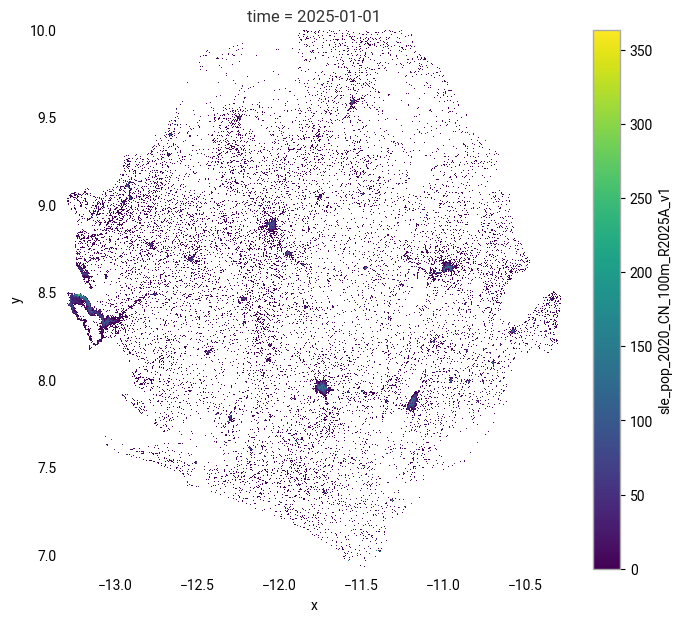
Next steps
This notebook has showed how to download the WorldPop total population count data. For guidance on how to further process the downloaded data, see:
As these are yearly data that includes future projections, the script likely only needs to be run once.