In this notebook we will demonstrate how we can use Climate Tools and dhis2eo to retrieve climate data for a set of DHIS2 organisation units, based on the ERA5-Land dataset, hosted at the ECMWF Climate Data Store (CDS).
Important: Make sure you have followed these instructions to authenticate and allow API access the CDS portal.
import geopandas as gpd
import xarray as xr

from dhis2eo.data.cds import era5_land
In order to know which geographical area we should download data for, we also load our Sierra Leone organisation unit GeoJSON file downloaded from DHIS2. Alternative, see our guide for how to fetch organisation units directly from your DHIS2 instance.
org_units = gpd.read_file('../../data/sierra-leone-districts.geojson')
org_unitsDownloading ERA5-Land data
The dhis2eo.data.cds.era5_land module allows you to easily download climate data for different time periods from the ERA5-Land dataset.
Hourly data
To import daily ERA5-Land data into DHIS2, one might be tempted to use the dataset ERA5-Land at daily levels, but this unfortunately does not include the precipitation variable. Instead, we recommend downloading ERA5-Land data at hourly levels, and then aggregating up to the daily level.
The ERA5-Land hourly data can be requested from the Climate Data Store as a single NetCDF file for a given month. To make this more convenient, we can use the hourly version of the dhis2eo.data.cds.era5_land module which iterates and downloads all monthly files for a given time period.
Parameters
We set the start and end parameters to only get climate data for the months of July, August, and September of 2025, and set the bounding box (bbox) to only get data for the spatial extent of the org units.
We also specify a dirname for where the data should be saved and a prefix for naming the downloaded files.
Finally, we specify which climate variables we want to download - specifically 2m temperature and total precipitation. For a list of all the available ERA5-Land variables, see the Dataset Download Page.
start = "2025-07"
end = "2025-09"
bbox = org_units.total_bounds
dirname = '../../data/local'
prefix = 'era5_hourly_sierra_leone'
variables = ["2m_temperature", "total_precipitation"]
Download to disk
Run the download function which will retrieve the data one month at a time to the location you specified. Downloads can take a few minutes for each month downloaded. The returned list shows the location of the downloaded files:
files = era5_land.hourly.download(start=start, end=end, bbox=bbox, dirname=dirname, prefix=prefix, variables=variables)
files
INFO - 2026-01-21 22:16:37,147 - dhis2eo.data.cds.era5_land.hourly - Month 2025-7
INFO - 2026-01-21 22:16:37,155 - dhis2eo.data.cds.era5_land.hourly - File already downloaded: C:\Users\karimba\Documents\Github\climate-tools\docs\guides\data\local\era5_hourly_sierra_leone_2025-07.nc
INFO - 2026-01-21 22:16:37,156 - dhis2eo.data.cds.era5_land.hourly - Month 2025-8
INFO - 2026-01-21 22:16:37,159 - dhis2eo.data.cds.era5_land.hourly - File already downloaded: C:\Users\karimba\Documents\Github\climate-tools\docs\guides\data\local\era5_hourly_sierra_leone_2025-08.nc
INFO - 2026-01-21 22:16:37,161 - dhis2eo.data.cds.era5_land.hourly - Month 2025-9
INFO - 2026-01-21 22:16:37,164 - dhis2eo.data.cds.era5_land.hourly - File already downloaded: C:\Users\karimba\Documents\Github\climate-tools\docs\guides\data\local\era5_hourly_sierra_leone_2025-09.nc
[WindowsPath('C:/Users/karimba/Documents/Github/climate-tools/docs/guides/data/local/era5_hourly_sierra_leone_2025-07.nc'),
 WindowsPath('C:/Users/karimba/Documents/Github/climate-tools/docs/guides/data/local/era5_hourly_sierra_leone_2025-08.nc'),
 WindowsPath('C:/Users/karimba/Documents/Github/climate-tools/docs/guides/data/local/era5_hourly_sierra_leone_2025-09.nc')]
The download function treats the files saved under the given dirname and prefix as a cache, so it can safely be rerun multiple times without re-downloading. To ignore the cache and fetch fresh data you can set overwrite=True.
Inspect the data
Now that the files exists on disk, there are many ways we could work with them. For now, let’s open the files as a single xarray dataset, by passing them to xr.open_mfdataset():
ds = xr.open_mfdataset(files)Inspecting the data we see that the xarray dataset contains the data variables t2m (2m temperature), and tp (total precipitation), and has 2208 hours in the time dimension (or 3 months of hourly data):
dsWhen working with ERA5 data you will often also see the coordinate variables number and expver, which are related to how the data was produced; these are not usually needed and can be dropped:
ds = ds.drop_vars(['number', 'expver'])Finally, let’s check what the precipitation (tp) was at 12:00 on August 31:
ds.sel(valid_time='2025-08-31T12:00')['tp'].plot(cmap='YlGnBu')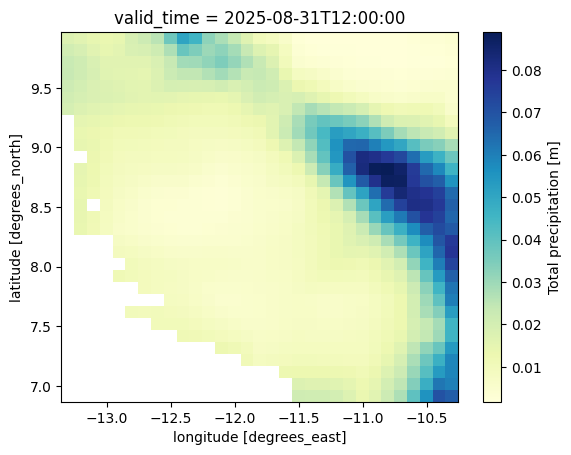
Important: Since DHIS2 does not deal directly with hourly data, you will also need to aggregate from hourly to daily data before you can import the data to DHIS2.
Monthly data
Sometimes you may only be interested in monthly climate data at longer time scales. In these cases, we recommend downloading the monthly ERA5-Land data.
These data can be downloaded as a single NetCDF file covering multiple years of monthly data, by using the monthly version of the dhis2eo.data.cds.era_land module.
Parameters
Similarly to the hourly data, we specify the start and end parameters for the time period 2000 to 2025, bbox of our organisation units, download dirname and prefix, and list of climate variables:
start = "2000"
end = "2025"
bbox = org_units.total_bounds
dirname = '../../data/local'
prefix = 'era5_monthly_sierra_leone'
variables = ["2m_temperature", "total_precipitation"]
Download to disk
Now we can run the download function which will download monthly climate data as a single NetCDF file:
files = era5_land.monthly.download(start=start, end=end, bbox=bbox, dirname=dirname, prefix=prefix, variables=variables)
files
INFO - 2026-01-21 22:15:26,062 - dhis2eo.data.cds.era5_land.monthly - File already downloaded: C:\Users\karimba\Documents\Github\climate-tools\docs\guides\data\local\era5_monthly_sierra_leone_2000-2025.nc
[WindowsPath('C:/Users/karimba/Documents/Github/climate-tools/docs/guides/data/local/era5_monthly_sierra_leone_2000-2025.nc')]Inspect the data
Since this is only a single file, let’s open the downloaded file as a regular xarray dataset, and drop the variables we don’t need:
monthly_ds = xr.open_dataset(files[0])
monthly_ds = monthly_ds.drop_vars(['number', 'expver'])
We see the result contains 312 months (about 25 years) of temperature (t2m) and precipitation (tp) data variables:
monthly_dsImportant: The monthly version of ERA5-Land reports all variables as daily averages. For some of the variables such as precipitation, we are instead interested in the total precipitation for the entire month. This can be done by multiplying the average daily precipitation (tp) with the number of days per month (xarray date fields provide this as an attribute .dt.days_in_month):
total_precip = monthly_ds['tp'] * monthly_ds.valid_time.dt.days_in_monthLet’s see what the total precipitation was for the month of August 2025:
total_precip.sel(valid_time='2025-08').plot(cmap='YlGnBu')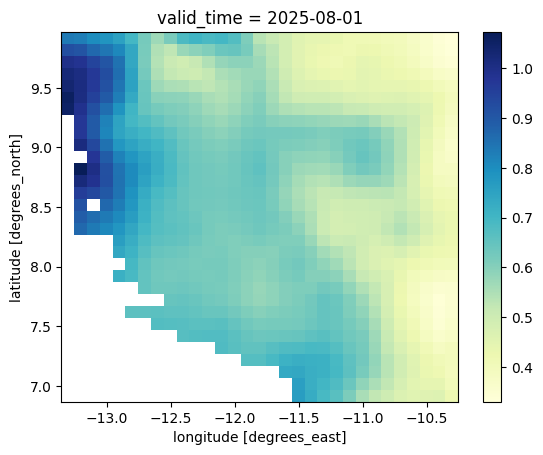
Next steps
This notebook has showed how to download both hourly and monthly ERA5-Land climate data. For guidance on what to do with the data after downloading, see:
If you want to skip to the end, you can also check out this example workflow that includes all the steps needed to download and import ERA5-Land data from start to finish.